
Vibe coding use to be a day in the life of a developer where one could implement a feature without leaving the IDE searching for answers on the web or stackoverflow.
With AI agents and IDE like cursor or windsurf, anybody can do that! Which means, your project repository might be targeted as potential avenue for all those new AI empowered users to dump their freshly generated code.
We’ll call them vibe coders, and while some contributions might be welcome to increase velocity it could quickly eat up all the gain it might provide due to sheer amount of review it would be necessary to make sure we’re not just yolo-ing our way to prod.
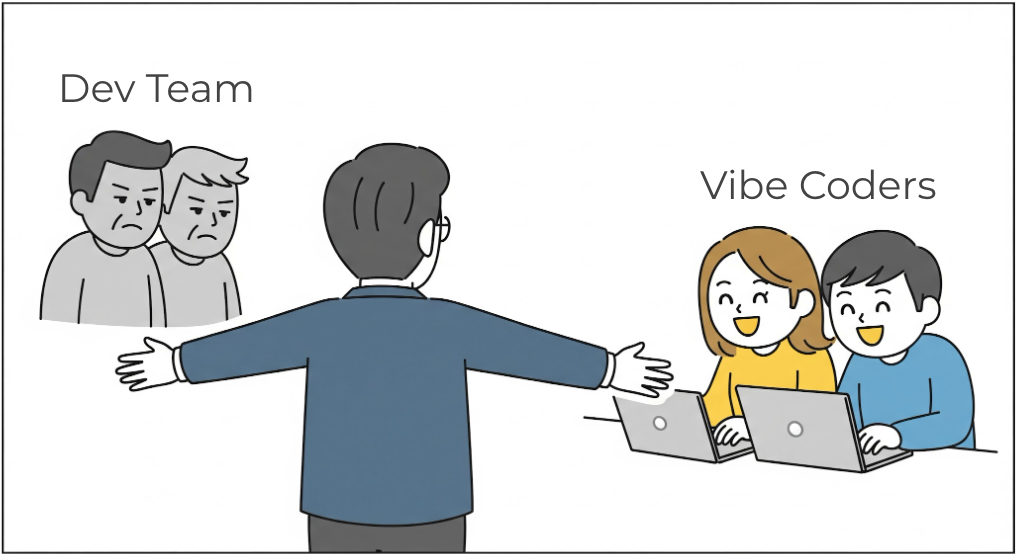
Given that I recently worked in such a predicament, onboarding non-technical people into our development team as vibe coders. I wanted to share some of the guidelines we’ve put in place.
Guidelines for Vibe Coders
AI Generated Code
AI can do with no effort 80% of the job, but the 20% remaining will take you a non-null amount to finish, exponentially proportional to the amount of code that 80% represents…
That’s the pareto rule of vibe coding, if the review process is too long because there are many things to change, adjust, then it’s probably not worth it, as your developer will spend more time explaining than it would take to fix.
You could want that retro-action to level up the skills of the vibe coders, but for occasional users that are often non-technical then that’s not worth it.
In those case I would recommend users to make contribution up to their level of general understanding. This means that vibe coders should not be expected to write complex code, or touch the business logic of the application. They should rather focus on UI/UX, marketing, or documentation changes (fixing, typo, fonts, colors, display, etc.).
Development contribution process
To receive the contribution from vibe coders, you will want a process that allows to gate-keep contributions so that they do not directly impact the main branch of your codebase. I would not recommend using trunk-based development for vibe coders, and would instead advise to use a pull request.
The other advantages of using PR, is that it’s much easier for vibe coders to find out why a contribution would be rejected. This can be done via your CI/CD which can include:
- Automated linting and formatting checks to ensure style consistency
- Static analysis to catch common issues and enforce coding standards
- Automated tests (unit, integration, e2e) to make sure the contribution does not break anything
- Automated Security checks for vulnerabilities
- AI Code review tools (Feed the AI generated code to an AI reviewer, the circle of AI 🤖) to help with the review process
A well build CI/CD helps the whole team contributing to the project, not just vibe coders!
Task Guidelines
Once the process is set and clear for everyone, you can have some more rules,
and guidelines that the vibe coders should follow.
You will want to use the README.md or Contributing.md file to store guidelines and process for both the developers
and AI agents.
You will also want to document how to lint, test, build, run the project locally within the repository.
For the guidelines to your vibe coders, you can include the following points:
- Keep it simple: Focus on simple changes that do not require deep understanding of the codebase.
- No complex logic, no backend changes, most likely no new dependencies
- Contribute to what you know: Focus on changes that are related to the user interface, user experience, marketing, or documentation that you know and can validate.
- Try locally: The setup should be documented so you can try the changes locally, so you can feed the errors straight back to the agent rather than copy/pasting them from the CI/CD.
- Refer to the AI rules: Use a set of AI rules that could point the AI agent to or that it will pick up by default (like cursor or windsurf).
- This is sometime saved as
ai_rules.mdor as custom rules set like in cursor and are usually an obvious set of rules on how to generate code, what to focus on, and what not to do.
- This is sometime saved as
Friction may occur, so we should all be open and try to make the process as smooth as possible. As much as developers should review vibe coded PRs, the vibe coders should also be part of the review process! This way the user experience feedbacks happen before the code is merged, and tiny changes can be agreed on and delegated to the vibe coder to fix.
AI rules example
Here is an example of a set of rules that could be used by the AI agent to generate code for a frontend project. WHat’s great is that you can always ask the AI to follow those rules (by “referring” to it), and it will try to do so.
# AI Coding Assistant Rules

## Project Overview
- This is a JavaScript/TypeScript frontend project
- We use React with Chakra for UI components
- Follow modern ES6+ syntax
- Use TypeScript types whenever possible

## Component Guidelines
- Use functional components with hooks, not class components
- Keep components small and focused on a single responsibility
- Extract reusable logic into custom hooks
- Use a standard structure: imports → types → component → exports
- Add proper JSDoc comments for component props
- Avoid inline styles, use CSS modules or styled components
- Keep lines under 100 characters
- Include proper ARIA attributes
- Provide alt text for all images

## Testing
- Write unit tests using Jest and React Testing Library
- Test component behavior, not implementation details
- Maintain at least 80% test coverage

## Dependencies
- Minimize external dependencies
- Prefer well-maintained libraries with TypeScript support

## Prohibited Practices
- No console.log in production code
- No any types in TypeScript
- No direct DOM manipulation
- No commented-out code
- No comments
- No hardcoded secrets or API keys
This is an example, but as the agent becomes more intelligent, it will be able to pick up those details with more ease.
We also use it, to specify specific company component library that we’d like to use, or specific design system. This file can get updated based on what the tool returned to help it generate code with better confidence.
If you are looking into how the agent can be set up, you can check out the CL4R1T4S project which drops the full system prompts and guidelines from AI models or agents of famous provides.
CLAUDE.md
Claude may read an ai_rules.md but the documentation also recommends to have a claude.md file.
Don’t worry it will also be either ignored or not read most of the time by Claude itself,
but at least you can just refer back to it instead of copy/pasting the rules every time.
# CLAUDE.md

This file provides guidance to Claude Code when working with code in this repository.

## Project Overview

[ Brief description of your project ]
[ Brief description of the tech stack ]

## Core Development Principles

For decision making, ranking the principles with the order of importance helps Claude prioritize.
(Correctness > Security > Consistency > Readability > Performance)

## Quick Command Reference

[ List the specific commands used in your project ]

## Development Patterns

### Code Documentation Rules

- **JSDoc Only**: Use JSDoc comments for exported functions, types, and classes
  - *Why: Documents public API and generates documentation automatically*
- **No Inline Comments**: Code should be self-explanatory through clear naming and structure
  - *Why: Comments become outdated; well-named functions and variables are self-documenting*
- **Example**:
  - ❌ BAD: Inline comments explaining the implementation
  ```typescript
  export function calculateTotal(items: Item[]) {
    // Sum up all the prices
    let total = 0;
    for (const item of items) {
      // Add item price to total
      total += item.price;
    }
    return total;
  }
  ```

  - ✅ GOOD: JSDoc at the top, self-explanatory code
  ```typescript
  /**
   * Calculates the total price of all items in the cart.
   * @param items - Array of cart items
   * @returns Total price sum
   */
  export function calculateTotal(items: Item[]): number {
    return items.reduce((sum, item) => sum + item.price, 0);
  }
  ```

### Component/Module Organization

- **Small, focused modules** with single responsibilities
  - *Why: Easier to test, understand, and maintain*
- **Keep files under ~300 lines**; refactor if larger
  - *Why: Large files indicate mixed responsibilities*
- **Co-locate** related code (component + styles + types in same file)
  - *Why: Related code is easier to find and modify together*

**Decision-Making Guidelines:**

*When to create a new module vs modify existing:*
- **Create new** if:
  - Logic is unrelated to existing modules
  - Module would be reusable across features
  - Existing module is already >250 lines
  - Creating a new module improves clarity
- **Modify existing** if:
  - Functionality is closely related
  - Module is <250 lines
  - Change is a simple enhancement or bug fix

### Testing Principles

1. **No Comments**: Tests must be self-documenting through clear `describe` and `it` descriptions
  - *Why: Test names serve as living documentation*
  - Good: `it('throws error when email format is invalid')`
  - Bad: Adding comments to explain what the test does

2. **Test Structure**:
   ```typescript
   describe('UserService', () => {
     describe('createUser', () => {
       it('creates user with valid data', async () => {
         const user = await userService.createUser({ email: 'test@example.com', name: 'Test' });
         expect(user.email).toBe(userData.email);
         expect(user.id).toBeDefined();
       });

       it('throws error when email is invalid', async () => {
         const userData = { email: 'invalid', name: 'Test' };
         await expect(userService.createUser(userData)).rejects.toThrow('Invalid email format');
       });
     });
   });
   ```

3. **Test Coverage**: Every module needs tests for:
  - Happy path (successful operations)
  - Error cases and edge cases
  - Boundary conditions
  - Input validation

### [ More principles ]

More principles can be added here as needed, with the what, why and patterns to follow.
(e.g., Error Handling, Performance Optimization, Security Practices, Code format, etc.)

## Common Workflows

How the AI agent should approach common development tasks. (adding a new feature, fixing a bug, refactoring code, etc.)
This needs to be specified in the prompt, allows to standardize the approach (like making a plan, TDD, review steps, running test or linter etc.)

## Common Pitfalls

Add here all the use cases where the AI got it wrong, and why with the correct way to do it,
to reduce the chance of it happening again.
When asked Claude directly how it likes his claude.md file to be structured,
it provided the following guidelines:
- Be Specific: Include actual commands, file paths, and examples from your project
- Explain Why: Always include rationale (“Why:”) for rules and patterns
- Show Examples: Use good/bad comparisons to make patterns clear
- Prioritize: Put most important info first (Quick Command Reference)
- Keep Updated: Review and update as project patterns evolve
- Decision Frameworks: Help AI make choices with “when to X vs Y” sections
- Stay Concise: Focus on what matters, not exhaustive documentation
Conclusion
Setting up guidelines is as much as to help us guarantee quality in our codebase, reduce friction with the developers, and make sure everything is set up to get the most meaningful vibe coded contributions. Well onboarded vibe contributors could boost your team’s velocity, and give that touch of polish that makes a product truly great!