
Claude Code starts every session without memory of the last one. Instead of prompting harder, let’s review the tools Claude and Claude Code gives us to make the LLM smarter. This could save you sometimes and tokens.
I am relying on Claude Code official documentation, to explain some of the most useful feature to improve Claude Code performance and reliability. I tried to use somewhat real examples for illustration.
How Claude Reads Your Repo
Claude Code loads context from files in a fixed order before it does anything else. Understanding this order tells you exactly where to put your conventions so they land every time.
flowchart TD
    A["~/.claude/CLAUDE.md\nGlobal user instructions"] --> B
    B["CLAUDE.md\nProject root"] --> C
    C["AGENTS.md\nvia @-include"] --> D
    D[".claude/settings.json\nHooks and permissions"] --> E
    E["~/.claude/projects/…/memory/MEMORY.md\nPersistent facts"]
Everything in that chain is read before Claude touches your code. Instructions closer to the top override those below.
CLAUDE.md: The Entry Point
CLAUDE.md at the project root is loaded automatically.
Keep it short and use @-includes to pull in focused documents without bloating the main file:
<!-- CLAUDE.md -->
@AGENTS.md

<!-- Uncomment when mid-feature to give Claude live task state -->
<!-- @wip/current.md -->
The @filename syntax inlines the referenced file’s content at that position.
Imports resolve relative to the file that references them and can nest up to four hops deep.
Use it to split instructions into focused documents that are easier to maintain independently.
Global instructions go in ~/.claude/CLAUDE.md.
Keep project-specific rules in the project’s own CLAUDE.md.
The two are not mutually exclusive: Claude loads every CLAUDE.md from the filesystem root down to your working directory and concatenates them, so the file closest to where you launched Claude is read last and wins on conflicts.
The OpenCode standard: AGENTS.md as a cross-tool contract
CLAUDE.md is Claude-specific. AGENTS.md is not.
The OpenCode convention, used by OpenCode and a growing set of AI coding tools, establishes AGENTS.md as the tool-agnostic layer for repo instructions. Any assistant that follows the convention reads it, which matters for teams that use multiple tools or might switch assistants over time.
Claude Code does not read AGENTS.md natively, it reads CLAUDE.md,
so you need to add @AGENTS.md in it to bridge the gap.
CLAUDE.md       ← Claude Code only: @-includes, wip references
AGENTS.md       ← All tools: build commands, file map, gotchas
.claude/        ← Claude Code only: settings, hooks, commands
While it may add up noise in the repository, the separation is intentional.
Put everything that should work with any agent in AGENTS.md, and have CLAUDE.md for extra Claude instructions.
If your team is all in with Claude you can leverage the .claude/ directory to share projects skills and commands,
or create your own harness which will feed it.
Reflexes via AGENTS.md
While CLAUDE.md handles routing, AGENTS.md is where the real reflex-encoding lives.
A well-written AGENTS.md turns one-time corrections into rules Claude will break less often (depending on the model and context).
Opus tends to be more disciplined than it’s fellow lower Claude model.
Build commands
A build-commands list is one of the section that pay off fastest.
## Build commands

    npm run build            # Build api + web + shared
    npm run dev              # Start api + web in watch mode
    npm test                 # Unit tests for all packages
    npm run test:e2e         # Playwright (requires dev server)
    npm run typecheck        # TypeScript check across all packages
    npm run lint             # ESLint across all packages
This is particularly useful for smaller model which might not get it right on the first try.
File map
Similarly, a high-level file map can help Claude understand the project structure without spending token understanding it everytime. But the more verbose it becomes the more likely it will rot or impact your sessions directing you to hallucinated paths.
## Key file locations

- `src/backend` — API routes, business logic, database models
- `src/frontend` — React app, UI components, client-side logic
- `src/shared` — Types, utilities, and code shared between backend and frontend
- `db/` — Database schema, migrations, seeds
Also, if your CONTRIBUTING.md already mentions must know items and code structure,
you could @ it so the LLM follows it.
Depending on the model you might want the agent one to be smaller for token efficiency, though.
Be careful to not have stale duplicated information between files as it will most likely create confusion.
Best practices and gotchas
You should set some clear project’s best practices rules (like pattern used, or rules to refer to when in doubt) for a smoother experience. The gotchas helps drive those by adding extra context when the LLM slips. Here you can set rules for common mistakes. Each entry should be for one class of mistake:
## Known gotchas

- **Generated files in packages/shared/src/generated/** — do not edit by hand.
  Run `npm run codegen` to regenerate from api/openapi.yaml.
- **Config via api/src/config.ts only** — never read process.env directly.
  Missing mandatory vars should fail loudly at startup, not at runtime.
- **Frontend uses the generated API client** — do not write raw fetch calls.
  Use the typed client in web/src/api/.
- **Shared types live in packages/shared** — do not duplicate type definitions
  between api/ and web/. If a type is needed on both sides, it belongs in shared.
- **React Query for server state** — do not store API response data in local
  component state or Redux. All server state goes through useQuery / useMutation.
Every time you correct Claude on something, ask yourself (or ask it 😅): does this belong in AGENTS.md? The answer should not be always yes, as some of them could be one off setup or could be improvements items that are worth implementing / fix in the code.
Because this approach does not scale without limit, though, and that is the catch. CLAUDE.md and anything it imports load in full at the start of every session, spending tokens before you type a word, and the docs are explicit that longer files reduce how reliably Claude follows them. The documentation recommends to keep it under ~200 lines and give some gimmicks to expand it via:
- Path-scoped rules in
.claude/rules/take YAMLpaths:frontmatter and only load when Claude touches matching files. A gotcha about the React client belongs in a rule scoped toweb/**, not in the always-on root file. - Skills hold multistep procedures that load only when invoked or when relevant, which can “cost” almost nothing until it is needed.
Persistent Memory
AGENTS.md is for conventions everyone knows upfront. Memory is for things you had to learn the hard way. Without it, you re-teach them every session.
Memory mechanism
Claude Code actually has two memory systems, and it helps to keep them straight:
CLAUDE.mdfiles are what you write. Loaded in full every session, they are instructions and rules. Everything above this section is about them.- Auto memory is what Claude writes. On by default (toggle with
/memory), Claude decides what is worth remembering as it works, build commands it figured out, a debugging insight, a preference you corrected, and saves it without you asking.
Auto memory files live at ~/.claude/projects/<project>/memory/, indexed by MEMORY.md. The
<project> path is derived from the git repo, so every worktree and subdirectory of the same repo
shares one memory directory, and it is machine-local, not shared across machines or teammates.
Memory also splits between per-project and general, much like CLAUDE.md does. Auto memory is
scoped per repository; there is no single global auto-memory store. The general half lives in the
user-level CLAUDE.md at ~/.claude/CLAUDE.md (and user rules in ~/.claude/rules/), which apply
to every project on your machine. Machine-wide habits therefore go in user-level CLAUDE.md,
while repo-specific learnings accumulate in that repo’s auto memory on their own.
Auto memory categories
Only the first 200 lines (or 25 KB) of MEMORY.md load at session start, so Claude keeps the index lean and pushes detail into topic files it reads on demand. Here is a list of memory type categories it can store:
| Type | What it stores | Example |
|---|---|---|
user |
Your role, expertise, preferences | “Software engineer, like concise syntax” |
feedback |
Patterns Claude kept getting wrong | “Stop using as X casts to silence inference errors” |
project |
Technical constraints that aren’t obvious from the code | “Two config.ts files (api/ and web/), not interchangeable” |
reference |
Where things live that you’ll forget | “Local dev: Vite 5173, API 3001, WS 3002” |
The user one is very useful to tailor the code style and behaviour of the LLM to fit yours. Less prompt fixing when the LLM knows how you like things. A feedback memory is most valuable when it describes a specific recurring mistake and exactly what to do instead. As with gotchas reviewing the feedback may help consolidate the CLAUDE.md or improving the codebase.
---
name: no-as-cast-workarounds
description: Fix the actual TypeScript mismatch; do not use `as X` or `as unknown as X`
type: feedback
---

When TypeScript inference fails, do not reach for `as SomeType` to silence the error.
Find the root cause and fix the type.

**Why:** Three times in a month a cast like `result as User` was hiding a place where
the query was returning `null` or a partial object.
TypeScript was right — the type was wrong.
The cast silenced the compiler and the bug only appeared at runtime, in prod.
The `as unknown as X` double-cast pattern is a red flag every single time.

**How to apply:** If inference is failing, check whether the return type is actually
what you think, whether a generic constraint is too loose,
or whether the same type is defined separately in `api/` and `packages/shared/`.
If a cast is genuinely right, add a comment explaining why the runtime guarantee holds.
The MEMORY.md index loads first, one line per entry:
# Project Memory

- [Invalidate after mutation](feedback_no_summaries.md) — call invalidateQueries in onSuccess or the UI shows stale data
- [No type assertion workarounds](feedback_type_assertions.md) — fix the type, don't cast around it
- [Two config files](project_two_configs.md) — api/src/config.ts and web/src/config.ts are not the same
- [Local dev ports](reference_dev_ports.md) — Vite 5173, API 3001, WebSocket 3002
Claude manages the memory and deletes them if duplicated or in contradiction with the current state of the repo, it may also re-validate old memories before asserting with confidence on it. However, it does not automatically update or prune them, so it doesn’t forget older long-running rules.
Commands and Skills
Both commands and skills become slash commands you invoke with /name, and both are
official Claude Code features (commands, skills). They used to be two separate mechanisms; they have since
merged. Usually we call a command a simpler instruction, and a skill a more complex one that uses frontmatter.
Commands: the simple form
A command is a plain .md file in .claude/commands/ (project) or ~/.claude/commands/
(personal). No frontmatter required; just write the instructions:
<!-- .claude/commands/comment-pr.md -->
Review the pull request identified in the arguments and post review comments on it.

`$ARGUMENTS` is either a PR number (e.g. `1234`) or a full PR URL
(e.g. `https://github.com/owner/repo/pull/1234`).

1. Resolve the target: if `$ARGUMENTS` is a URL, extract the owner, repo, and number; otherwise
   assume the current repo and treat `$ARGUMENTS` as the PR number.
2. Fetch the diff and metadata with `gh pr view "$ARGUMENTS" --json title,body,files` and `gh pr
  diff "$ARGUMENTS"`.
3. Review the diff for correctness bugs, missing edge cases, and unclear naming. Note each
   finding with its `file:line`.
4. Summarize the findings before posting and confirm with me.
5. Post inline comments with `gh pr comment` / the GitHub review API, attaching each comment to
   its `file:line`.
6. Add one top-level summary comment covering the overall assessment.
Invoke it with /comment-pr 1234, $ARGUMENTS captures everything after the command name.
Skills: the full-featured form
A skill is a SKILL.md in its own directory. The directory can hold supporting files, and the frontmatter
unlocks the features a bare command lacks:
---
name: test-all
description: Run lint, typecheck, unit tests, and e2e tests in order
allowed-tools: Read, Grep, Bash(node:*), Bash(echo:*), Bash(npm:*), Bash(yarn:*), Bash(pnpm:*), Bash(bun:*)
model: haiku
---

- Package manager: !`node -p "(require('./package.json').packageManager||'npm@').split('@')[0]"
  2>/dev/null || echo npm`

Using the package manager detected above, run these steps in order,
and suggest next steps if any of them fail at the end:

1. lint:fix (if the script exists)
2. lint
3. typecheck
4. test
5. test:e2e
The frontmatter fields that matter most, with their actual semantics:
| Frontmatter key | Effect |
|---|---|
description |
What the skill does; Claude uses it to decide when to auto-invoke. Recommended. |
allowed-tools |
Pre-approves these tools so the skill runs without permission prompts (not a restriction) |
disallowed-tools |
Removes tools from the pool while the skill is active |
disable-model-invocation |
true = only you can invoke it with /name; Claude won’t trigger it automatically |
user-invocable |
false = only Claude invokes it; hidden from the / menu |
context: fork |
Runs the skill in a forked subagent with a fresh context window |
agent |
Which subagent type runs it when context: fork is set (e.g. Explore, Plan) |
Two of these are easy to get backwards: allowed-tools grants permission, it does not restrict
(use disallowed-tools for that), and disable-model-invocation is about who can trigger the
skill, not a read-only mode.
If you don’t trust the model you may want to be more restrictive for the tools allowed (like allowing specific bash commands instead of all bash).
Usually faster model are less trustworthy but cheaper for deterministic skills,
so you can automate simple repetitive tasks of the workflow.
The !`command` prefix injects live command output before the skill content is sent, so the
skill sees actual data rather than the command string.
Auto-triggering and consent
By default, both you and Claude can invoke a skill. You type /name; Claude auto-invokes when
your request matches the skill’s description. The mechanics here are what determine whether any of
this need your consent.
Depending on the commands !command to run in the skill (known as command injection),
if it is not in the allowed-tools list, Claude should ask for permission.
Skill descriptions are always in context so Claude knows what exists, but the full body only loads when the skill is actually invoked. Auto-invocation is simply Claude choosing to load a skill it judges relevant. So you should regularly prune skills you don’t use so they don’t bloat your context.
Project vs personal skills
Skills are not global-only, they can be project-scoped too:
| Location | Scope | Best for |
|---|---|---|
.claude/skills/<name>/SKILL.md |
Project only | Team skills with frontmatter/tooling |
~/.claude/skills/<name>/SKILL.md |
All projects | Personal quality gates, fork-context tools |
<plugin>/skills/<name>/SKILL.md |
Where enabled | Enterprise, Shareable collections, namespaced /plugin:name |
The plugin ones usually don’t collide as they are called via /plugin:name,
but the project and personal ones share the same namespace and can step on each other.
In that case it’s like the CLAUDE.md, the personal one wins against the project one.
Create the best skill by analyzing your previous sessions to find repeated instructions or corrective actions that could be automated.
Personal ones could be added to the marketplace to share the love or added to your team AI skill repo if one exists. Project skills could be committed and shared with the team and are usually only relevant in the context of the project.
Hooks
Commands and skills run on demand or when Claude feels like it. Hooks run automatically when specific events fire.
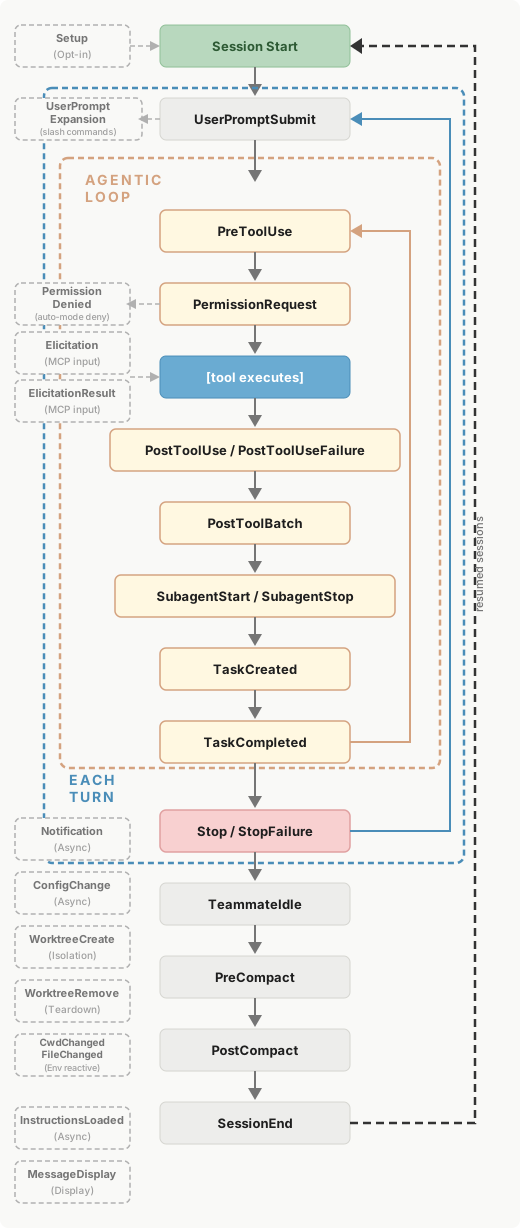
Configure them in .claude/settings.json:
{
  "hooks": {
    "PostToolUse": [
      {
        "matcher": "Edit|Write",
        "hooks": [
          {
            "type": "command",
            "command": "npm run typecheck 2>&1 | tail -5"
          }
        ]
      }
    ]
  }
}
This fires the typecheck after every file write. If the typecheck fails, Claude sees the output and can fix the error before moving on, without you having to ask.
At each lifecycle event (PreToolUse, PostToolUse, UserPromptSubmit, SessionStart, SessionEnd, …), the runtime checks the matcher
itself and runs the command.
The matcher corresponds to the tool name (e.g. Write for file writes, Edit for code edits, """ for any tool) and supports regex.
The tool can be a built-in one or a custom one like a MCP tool.