
Google Cloud Datastore is a schemaless NoSQL database for storing and querying entities. It is also now available as Datastore mode in Firestore, retaining the Datastore API while using Firestore’s storage layer.
If you are evaluating cloud databases for high-volume transactions or multi-tenant SaaS, check out the earlier database and usage overview for how NoSQL document stores stack against SQL and wide-column engines. Here is how Datastore works, how its data shape compares to SQL, how to query it with GQL, and how to wire it up with TypeScript.
Datastore mode vs Firestore Native mode
The two modes share a storage layer but serve different application needs:
| Feature | Native mode | Datastore mode |
|---|---|---|
| Data model | Documents in collections and subcollections | Entities organized by kind, with optional ancestor paths |
| Tenant partitioning | Separate databases or application-managed paths | Built-in namespaces within a database |
| Querying | Firestore query API | Datastore query API and GQL |
| Real-time updates | Listeners for data changes | No real-time listeners |
| Direct client access | Mobile and web SDKs with Firebase Security Rules | Backend access through the Datastore API and IAM |
Native mode is suited to applications that need real-time updates or direct mobile and web access. Datastore mode is useful for existing Datastore applications and backends that use namespaces to partition tenant data. Namespaces partition data but are not security boundaries.
See Google’s mode comparison for more detail.
Relational SQL terms mapped to Datastore NoSQL
Datastore entities are schemaless: two entities of the same type can carry completely different properties. Translating relational vocabulary to Datastore concepts helps bridge the mental model:
| Relational SQL | Datastore Concept | Characteristics |
|---|---|---|
| Table | Kind | Groups entities for querying (e.g. Task, Account). Entities of the same kind can have different properties. |
| Row | Entity | A record with a key and named properties. (Max size ~1 MiB). |
| Column | Property | A named value. Datastore does not enforce a fixed schema; values can include strings, numbers, booleans, timestamps, keys, embedded entities, and arrays. |
| Primary Key | Key | Uniquely identifies an entity: its database/project context and namespace, plus a path of kind-and-identifier pairs. The path can include ancestors; its final pair identifies the entity. |
| Foreign Key / JOIN | No direct equivalent | An ancestor path represents a hierarchical parent-child relationship, not a general-purpose foreign key. Datastore does not support joins. |
For example, two entities of the same kind can have different properties:
Database
  Namespace: tenant-acme
    Kind: Task
      Entity
        key: Task/101
        properties:
          title:  "Write guide"
          status: done
      Entity
        key: Task/102
        properties:
          title:    "Review guide"
          priority: 2
The entity key identifies the whole entity. Properties such as title and status hold its data; they are separate
from the key.
Keys and hierarchy
Every entity requires a unique Key. A key can use either an auto-generated integer ID or a developer-supplied string
name. Entities can also declare an ancestor, nesting child entities inside an entity group:
flowchart TD
    subgraph Partition ["Partition: project-id / namespace: 'tenant-acme'"]
        direction TB
        Org["Kind: Organization<br/>Name: 'acme'"]
        User["Kind: User<br/>Name: 'usr_42'<br/>(Ancestor: Organization/'acme')"]
        Task1["Kind: Task<br/>ID: 101<br/>(Ancestor: User/'usr_42')"]
        Task2["Kind: Task<br/>ID: 102<br/>(Ancestor: User/'usr_42')"]

        Org --> User
        User --> Task1
        User --> Task2
    end
Read the key path as kind-and-identifier pairs from the root to the entity:
Organization/'acme' → User/'usr_42' → Task/101.
This means Task 101 is a child of User 'usr_42', which is a child of Organization 'acme'.
A query such as Task HAS ANCESTOR User/'usr_42' returns tasks whose paths include that user, such as Task 101 and
Task 102; it does not search unrelated branches. The root entity and all its descendants form an entity group.
Transactions are atomic and serializable, and can operate on up to 25 entity groups.
Namespaces for multi-tenancy and data partitioning
A Datastore PartitionId combines your Google Cloud projectId and a namespaceId:
PartitionId = (projectId, namespaceId)
When you omit the namespace, entities land in the default empty namespace ("").
Where namespaces work well
- Multi-tenant SaaS partitioning: Store each customer or tenant in their own namespace (e.g.
tenant_abc123). Every tenant shares identical kinds and indexes, eliminating database schema provisioning steps when onboarding. - Ephemeral integration tests: Run integration suites in a test run namespace (e.g.
test_run_20261028_99), then bulk delete the namespace when tests finish without risking parallel test runs. - Staging / dev segmentation: Separate developer sandboxes within a single non-production GCP project.
Operational constraints
- Queries cannot cross namespaces: A query executes against exactly one namespace at a time. If you need aggregate reporting across all tenants, you must loop through namespaces or export to BigQuery.
- Namespaces are not IAM security boundaries: A service account with
roles/datastore.usercan read and write data in every namespace in the project. Namespaces partition data, but do not enforce tenant access controls; the backend application must authorize each tenant’s access. - Immutability: You cannot move an existing entity between namespaces. You must read it, write it to the new key, and delete the original.
See the official multitenancy documentation for sizing and index behaviors.
Querying with GQL
GQL (Google Query Language) is a SQL-like query grammar designed for Datastore. You can run GQL directly in the Google Cloud Console (under Datastore / Firestore Studio > Entities > Query by GQL) or over the v1 REST / gRPC API.
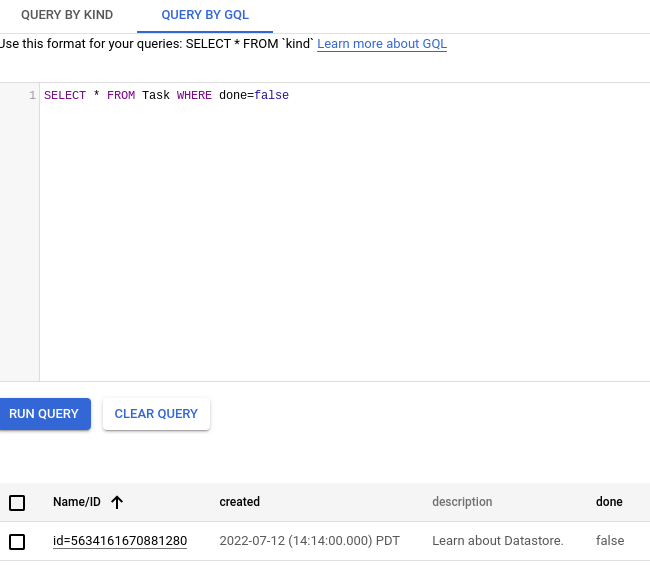
See the GQL Reference for the complete grammar.
Core syntax and projections
In GQL, FROM Task selects the kind to query, so the query operates on entities of that kind. SELECT then
chooses what to return from each matching entity: all properties, a subset of properties (a projection), or just the
entity key. The selected properties are not columns in a fixed schema; entities of the same kind can have different
properties.
-- Retrieve all properties
SELECT * FROM Task

-- Projection query: return only requested properties (faster, cheaper read rate)
SELECT title, dueDate, priority FROM Task

-- Keys-only query: returns entity keys with zero property data (lowest cost)
SELECT __key__ FROM Task
GQL keywords are case-insensitive, while kind and property names are case-sensitive.
Filtering, ordering, and limits
__key__ is a built-in property that refers to an entity’s key; it is not a property stored on the entity. Use it
when a query needs to select or compare entity keys.
-- Filter entities, sort by priority, and limit the results
SELECT * FROM Task
WHERE done = false AND priority >= 4
ORDER BY priority DESC
LIMIT 20
OFFSET @startCursor
For the next page, pass the cursor returned by the previous query to the Datastore API as its start cursor. Cursors
are API pagination tokens, not GQL OFFSET values.
At most one property may use an inequality filter (<, <=, >, >=); other filtered properties must use equality.
With an inequality filter, its property must come first in ORDER BY.
Combining multiple equality, inequality, or ordering requirements may need a composite index.
Key and ancestor lookups
Use KEY(...) to compare a key property and ANCESTOR to search an entity hierarchy. KEY construction follows
the key path: include NAMESPACE(...) only when the key belongs to a non-default namespace.
-- A key lookup: finds Task/task_987 in the default namespace
SELECT * FROM Task WHERE __key__ = KEY(Task, 'task_987')

-- The same key in tenant-acme
SELECT * FROM Task WHERE __key__ = KEY(NAMESPACE('tenant-acme'), Task, 'task_987')

-- Finds Task entities anywhere below User/usr_42
SELECT * FROM Task WHERE __key__ HAS ANCESTOR KEY(User, 'usr_42')
For kindless queries, omit FROM Kind and filter only on __key__. This example returns keys greater than
Task/task_100:
SELECT __key__ WHERE __key__ > KEY(Task, 'task_100')
TypeScript adapter for Datastore
The official Node.js client library is @google-cloud/datastore. The SDK provides a fluent query builder and
batch operations.
Install the dependency:
npm install @google-cloud/datastore
This example saves a task under a tenant and user, then queries pending tasks with a cursor for the next page:
import { Datastore, PropertyFilter } from '@google-cloud/datastore';

interface Task {
  title: string;
  description: string;
  priority: number;
  status: string;
}

const datastore = new Datastore();

async function saveTask(tenant: string, userId: string, taskId: string, task: Task): Promise<void> {
  const key = datastore.key({ namespace: tenant, path: ['User', userId, 'Task', taskId] });
  await datastore.save({ key, data: task, excludeFromIndexes: ['description'] });
}

async function listPendingTasks(tenant: string, userId: string, cursor?: string) {
  const userKey = datastore.key({ namespace: tenant, path: ['User', userId] });
  let query = datastore.createQuery(tenant, 'Task')
    .hasAncestor(userKey)
    .filter(new PropertyFilter('status', '=', 'pending'))
    .order('priority', { descending: true })
    .limit(20);

  if (cursor) query = query.start(cursor);

  const [tasks, info] = await datastore.runQuery(query);
  return { tasks: tasks as Task[], endCursor: info.endCursor };
}
The task ID is a caller-supplied key name. description is excluded from indexes, so it cannot be used in filters or
sorts. The type assertion on query results does not validate stored data; validate it at runtime if its shape is not
guaranteed.
Note on Node.js and GQL strings
A common source of confusion: the Node.js @google-cloud/datastore client library does not expose a high-level
gqlQuery("SELECT ...") string parser. The GQL query language is executed through the Google Cloud Console or the
low-level REST/gRPC endpoints (projects.runQuery). In TypeScript backends, you construct queries programmatically
using datastore.createQuery(namespace, kind) as demonstrated above.